Contact Us
China Top CBCT Guided Surgery Systems for Global Buyers
For global buyers, selecting a CBCT guided surgery system requires more than comparing prices and image resolution. The real question is practical: can the system produce dependable three-dimensional data, support accurate planning, and fit daily clinical workflows?
Dr. William C. Scarfe, a respected oral and maxillofacial radiologist, has stated, “CBCT should be used when the diagnostic task requires three-dimensional information.” That principle remains important. A larger field of view may support complex maxillofacial cases, while a smaller field can reduce unnecessary exposure during implant planning. Clear voxel settings, stable patient positioning, and reliable software integration also matter.
Small details matter.
A dental clinic may need open STL and DICOM compatibility, guided implant planning, nerve canal visualization, and straightforward export functions. Buyers should also examine detector performance, metal-artifact reduction, scan time, warranty response, training, and local service capacity. Chinese manufacturers offer diverse configurations, from compact chairside units to advanced systems for hospitals and imaging centers. However, specifications can appear stronger on paper than in routine use. That gap deserves attention.
Ask for clinical demonstrations, sample datasets, maintenance terms, and documented compliance with applicable regional requirements. Independent validation is useful. So is feedback from experienced users.
No single machine is ideal for every practice. A lower-cost system may provide excellent value, yet require stronger staff training or limited software support. This guide compares leading China-made CBCT guided surgery systems through clinical usability, technical capability, purchasing reliability, and long-term service considerations.
What Is a CBCT-Guided Surgery System?
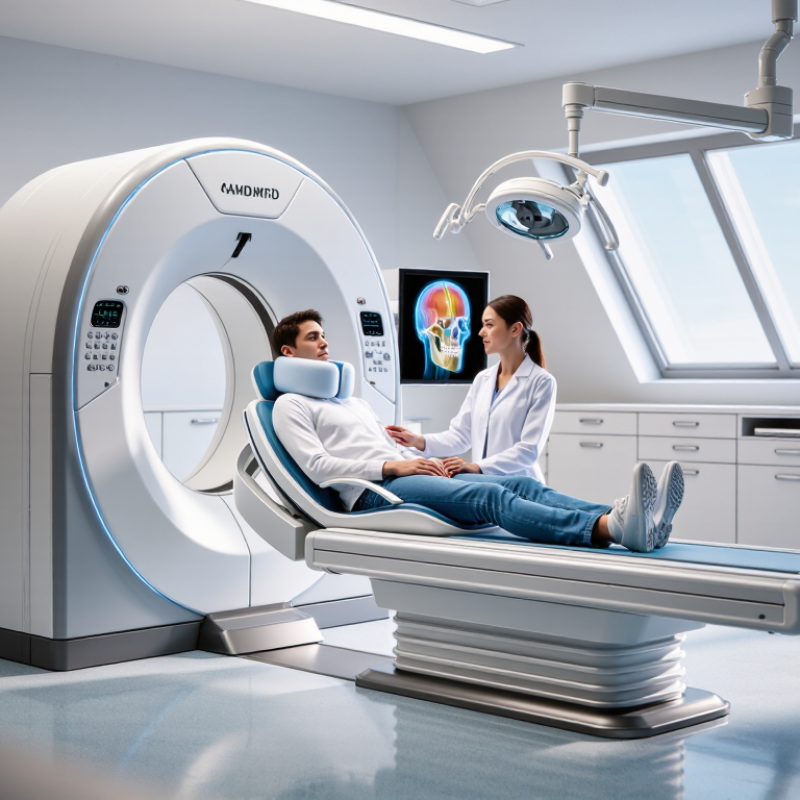
A CBCT-guided surgery system combines cone-beam computed tomography with digital planning and surgical guidance. It creates a three-dimensional view of bone, teeth, nerves, sinuses, or other relevant anatomy. Unlike a standard two-dimensional dental image, CBCT data helps clinicians inspect depth and spatial relationships. The system may connect scanning software, planning tools, and a printed or dynamic surgical guide. In practice, it supports implant placement, bone procedures, and selected oral or maxillofacial operations.
The workflow begins with patient positioning and a carefully selected scan volume. A clinician then checks image quality, matches the scan with an intraoral scan or digital model, and marks important anatomical structures. The planned path can show angulation, depth, and clearance before surgery. During treatment, a static guide may direct the drill, while navigation can display the instrument position on a screen. Small details matter. Movement, metal artifacts, poor registration, or an unstable guide can reduce accuracy.
Movement, metal artifacts, poor registration, or an unstable guide can reduce accuracy.
A reliable system needs more than impressive software. It requires trained operators, validated protocols, regular calibration, secure data handling, and clear clinical responsibility. Experienced teams compare digital plans with the patient’s actual anatomy during treatment. CBCT also involves radiation, so imaging should be justified and optimized for the clinical question. It is not magic. A clean scan can still support a poor decision if the diagnosis is incomplete. Global buyers should examine accuracy claims, workflow compatibility, service training, and regulatory documentation. These checks may feel slow, but skipping them can create costly surprises.
How CBCT-Guided Surgery Systems Work
CBCT-guided surgery begins with a controlled X-ray rotation around the patient. A cone-shaped beam captures hundreds of projections. Reconstruction software converts them into a three-dimensional volume. Each voxel represents a small tissue location, often measured in fractions of a millimeter. The surgeon can inspect bone height, canal paths, sinus boundaries, and implant positioning from different angles. This is more informative than a single flat radiograph. However, the image is not magic. Metal restorations can create streaks, and patient movement can blur delicate anatomy.
The workflow usually combines CBCT data with planning software and surgical guidance. A digital model may be aligned with the scan, while tracking tools compare the planned and actual instrument position. The European Commission’s Radiation Protection No. 172 reported dental CBCT effective doses from about 11 to 1,073 microsieverts, depending on equipment and scanning settings. That range is substantial. It supports the IAEA’s optimization principle: use the smallest field of view and lowest suitable exposure for the clinical question. Higher resolution is not automatically better. Operators must check calibration, registration accuracy, and scan quality before cutting. A 2022 systematic review in Clinical Oral Implants Research also found that guided workflows can improve positional accuracy, but errors still accumulate across imaging, software, guides, and instruments. That limitation deserves more attention.
Key Components and Surgical Guidance Features
For global buyers, CBCT guided surgery systems should be assessed through their working components, not appearance. A compact gantry captures three-dimensional images around the patient. The flat-panel detector supports detailed visualization of bone, roots, canals, and implant sites. A stable patient support reduces motion during scanning. Small movements still matter.
The surgical workstation converts CBCT data into a practical treatment plan. It should offer clear multiplanar views, implant positioning, distance measurements, and nerve canal marking. Accurate DICOM handling is essential when importing data from different imaging environments. Calibration tools connect the virtual plan with the patient’s actual anatomy. Optical or electromagnetic tracking can then guide instruments during surgery. The display should remain visible without forcing the clinician to turn away repeatedly.
In daily use, guidance accuracy depends on more than software. Registration must be checked before drilling, and trackers need a firm, unobstructed position. Real-time alerts may identify angular or depth deviations, but they cannot replace clinical judgment. I have found that simple interfaces often perform better under pressure. However, some systems still require extra training for reliable workflow adoption. Buyers should request verification records, service response details, cleaning instructions, and operator training before purchase. A useful system makes errors easier to notice, not merely easier to create.
China Top CBCT Guided Surgery Systems for Global Buyers - Key Components and Surgical Guidance Features
| System Component | Typical Technical Data | Role in Surgery | Surgical Guidance Features | Key Buyer Considerations |
|---|---|---|---|---|
| CBCT X-Ray Source | Cone-beam X-ray tube with adjustable exposure settings; commonly operated in the approximate range of 80–120 kV, depending on the system and clinical protocol. | Generates the X-ray beam used to create three-dimensional anatomical images of bone, teeth, and selected soft-tissue interfaces. | Supports protocol-based imaging for implant placement, maxillofacial procedures, ENT applications, and image-guided navigation. | Confirm tube duty cycle, heat management, exposure control, serviceability, and compliance with local radiation regulations. |
| Flat-Panel or Digital Detector | Digital detector with selectable voxel sizes commonly ranging from approximately 0.08 to 0.4 mm, depending on field of view and examination mode. | Captures projection data for reconstruction of high-resolution volumetric images. | Provides detailed visualization of cortical bone, root anatomy, implant sites, osteotomy regions, and anatomical landmarks. | Review detector size, spatial resolution, image uniformity, calibration requirements, and replacement availability. |
| Rotating Gantry | Motorized rotational assembly designed for circular or limited-angle scanning; scan time is commonly about 5–30 seconds, depending on protocol. | Moves the X-ray source and detector around the patient to collect multiple projections. | Enables repeatable imaging geometry and supports preoperative, intraoperative, or postoperative verification workflows. | Evaluate mechanical stability, collision prevention, patient access, positioning range, and emergency stop functions. |
| Field-of-View Selection | Available fields of view vary by configuration; common systems offer small dental volumes as well as larger craniofacial or maxillofacial volumes. | Allows the operator to select the smallest practical scan area for the intended clinical task. | Improves anatomical targeting and can reduce unnecessary exposure by limiting imaging to the surgical region of interest. | Check available volume sizes, automatic collimation, patient-centering aids, and protocol customization. |
| Patient Positioning System | May include adjustable table, head support, chin support, bite block, immobilization straps, laser alignment, and selectable supine or seated positioning. | Maintains patient alignment and reduces motion during image acquisition. | Laser crosshairs and indexed supports assist with reproducible positioning and alignment with the planned surgical coordinate system. | Assess weight capacity, access for anesthetized patients, immobilization options, cleaning, and compatibility with operating-room use. |
| 3D Reconstruction Engine | Reconstructs volumetric datasets in axial, coronal, sagittal, curved-planar, and three-dimensional views; export commonly uses DICOM. | Converts projection data into interpretable anatomical images for diagnosis and surgical planning. | Supports multiplanar reconstruction, cross-sectional measurement, density visualization, and anatomical landmark identification. | Verify reconstruction speed, DICOM conformance, workstation performance, data storage, and backup options. |
| Surgical Planning Software | Planning modules may include segmentation, distance and angle measurement, virtual implant placement, airway analysis, and model import. | Converts CBCT images into a patient-specific surgical plan before the procedure. | Provides virtual trajectories, safety margins, implant positioning, nerve-canal marking, and planned osteotomy visualization. | Check software licensing, update policy, multilingual support, training, and compatibility with third-party planning tools. |
| Optical or Electromagnetic Tracking | Navigation configurations may use optical cameras with reflective markers or electromagnetic field generators with tracked instruments. | Tracks the position and orientation of the patient reference and surgical instrument in real time. | Displays instrument position on synchronized CBCT views and helps the surgeon follow the planned trajectory during navigation-assisted procedures. | Compare tracking accuracy, line-of-sight limitations, interference risk, calibration workflow, and instrument compatibility. |
| Patient Reference Frame | Rigid reference marker or frame attached to the patient or a stable support; designed to preserve the relationship between the patient and image dataset. | Provides the coordinate reference required to register the patient with the preoperative CBCT volume. | Maintains spatial registration while the surgeon moves the tracked instrument within the operative field. | Review fixation method, sterility options, patient comfort, marker visibility, and resistance to movement. |
| Image-to-Patient Registration | Registration may use fiducial markers, surface matching, anatomical landmarks, or hybrid workflows; accuracy depends on technique and clinical setup. | Aligns the virtual CBCT anatomy with the patient’s actual anatomy. | Enables real-time navigation by transforming instrument coordinates into the patient-specific image space. | Request documented registration workflow, verification tools, error display, and user training requirements. |
| Navigation Display | Medical-grade monitor or touchscreen showing synchronized axial, sagittal, coronal, and three-dimensional views. | Presents the planned path, current instrument location, depth, angulation, and target anatomy to the surgical team. | Typical displays include trajectory lines, virtual tips, distance-to-target indicators, and deviation measurements. | Evaluate screen brightness, viewing angle, sterile draping, user interface, and compatibility with operating-room lighting. |
| Tracked Surgical Instruments | Instrument sets may include probes, drills, suction tools, registration pointers, and implant-placement tools with calibrated tracking geometry. | Transfers the planned path from the software environment to the operative field. | Provides real-time feedback on instrument tip location, axis alignment, insertion depth, and proximity to defined anatomical structures. | Confirm calibration stability, sterilization method, reusable or disposable status, and availability of procedure-specific tools. |
| Robotic or Mechanical Guidance Interface | Some configurations provide a passive guide, active arm, or mechanically constrained trajectory system; capabilities differ by indication and regulatory clearance. | Assists with maintaining a planned drilling or cutting direction and may limit movement outside defined boundaries. | Can provide haptic, mechanical, or software-based constraints for depth, angulation, and trajectory control. | Verify intended clinical indications, safety interlocks, emergency release, maintenance, and local regulatory authorization. |
| DICOM and Hospital-System Connectivity | Common interfaces include DICOM Query/Retrieve, storage, worklist, and print functions; integration depends on the facility network. | Transfers patient studies and surgical plans between imaging, planning, navigation, and hospital information systems. | Supports consistent use of the correct patient dataset and reduces manual data-transfer steps in the surgical workflow. | Assess cybersecurity, user authentication, audit trails, PACS compatibility, network requirements, and data export rights. |
| Radiation Protection and Dose Management | Features may include selectable exposure protocols, pulsed acquisition, beam collimation, exposure indicators, and dose-area or dose-related reporting. | Helps manage radiation exposure while obtaining images suitable for the intended procedure. | Supports protocol selection based on anatomical region, required resolution, patient size, and clinical purpose. | Request dose documentation, quality-control procedures, shielding guidance, and compliance support for the destination market. |
| Quality Assurance and Calibration | Routine checks may include geometric accuracy, image uniformity, contrast performance, artifact assessment, detector calibration, and navigation verification. | Maintains image quality and spatial accuracy over the equipment life cycle. | Calibration and verification tools help confirm that image coordinates, patient registration, and tracked instruments remain aligned. | Confirm acceptance testing, preventive-maintenance intervals, service response time, spare parts, and operator QA documentation. |
Technical specifications are representative ranges or commonly available functions rather than a specification for one particular system. Final performance, indications, and regulatory status should be verified against the supplier’s official documentation and the requirements of the destination market.
Top CBCT-Guided Surgery Systems for Global Buyers
For global buyers, CBCT-guided surgery systems should be judged by clinical workflow, not impressive specifications alone. A practical evaluation starts with image quality, field of view, radiation control, and navigation accuracy. These factors affect implant planning, maxillofacial procedures, and other image-guided interventions. Clear images matter.
In real clinical settings, installation space and operator training can be equally important. A compact system may suit a crowded treatment room, while a larger field of view can support complex anatomical assessment. Buyers should examine calibration procedures, software compatibility, data export options, and emergency support. Ask for service response times, training records, and documented performance testing. Systems manufactured in China may offer flexible configurations, but every claim should be checked against independent technical documents and local registration requirements.
No system is perfect. A higher resolution setting may increase scanning time or radiation exposure, depending on the protocol. Automated planning can save time, yet experienced clinicians still need to review boundaries, artifacts, and anatomical risks. I would request sample scans, workflow demonstrations, and references from facilities with similar case volumes. One overlooked issue is long-term software support. A low purchase price means little if updates, replacement parts, or technical guidance become difficult later. Global buyers should compare total ownership costs, not only the initial quotation, and involve surgeons, radiographers, biomedical engineers, and compliance staff before approval.
China Top CBCT-Guided Surgery Systems for Global Buyers
Representative cone-beam CT field-of-view categories used when evaluating systems for guided dental and maxillofacial surgery.
Larger fields of view cover more anatomy, while smaller fields of view are generally selected for localized, high-detail procedures. Actual field-of-view options, voxel size, dose, and workflow features vary by system and clinical protocol, so buyers should verify the manufacturer’s technical documentation and regulatory approvals.
How to Evaluate CBCT Systems for Clinical Use
China Top CBCT Guided Surgery Systems for Global Buyers
How to Evaluate CBCT Systems for Clinical Use
Clinical evaluation should begin with the intended procedure, not the brochure. A system for implant planning needs clear cortical borders, stable geometric accuracy, and practical field-of-view selection.
The SEDENTEXCT project reported effective CBCT doses from about 11 to 1,073 μSv, depending on equipment, protocol, and scan volume. Lower dose is valuable, but excessive noise can weaken clinical decisions. The best setting is not always the lowest setting.
Ask for phantom-test results and real surgical examples. Check voxel size, metal-artifact reduction, motion correction, and reconstruction consistency.
A 0.2 mm voxel sounds precise. It does not guarantee 0.2 mm clinical accuracy. Positioning errors, patient movement, and calibration may matter more. I would request repeated scans of the same phantom before purchase.
Workflow deserves equal attention. Can staff export standard DICOM files? Does the system integrate with planning software and surgical-guide workflows?
ICRP Publication 129 emphasizes justification and optimization for medical exposure. Therefore, operators need adjustable FOV, documented protocols, and routine quality assurance.
Service response also affects patient care. A technically strong unit becomes less useful when repairs require long delays. That point is easy to underestimate.
Evaluation should include training records, acceptance testing, dose monitoring, and feedback from surgeons who use the system daily.
Related Posts
-
What is CBCT Guided Surgery and How Does it Work?
-

7 CBCT Guided Surgery Tips for Dental Buyers?
-
How to Use Dental Surgical Guides for Precise Implant Placement?
-
Top Dental Implant Technology Trends for Global Buyers
-

10 Best Benefits of Ceramic Dental Restorations for Your Smile?
-

7 Tips for Buying Precision Dental Prosthetics?